Overview

Hardware

Aziloop DF-72 is unique in using our Stepped-Azimuth™ technology to produce up to 72 uni-directional headings in K9 mode or 36 bi-directional headings in Loop mode from a pair of orthogonal loops. The result is a choice of 108 heading/mode combinations.

To be clear, the antenna does not move, rotation is achieved electronically.


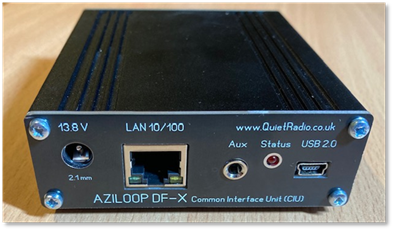
DF-X Common Interface Unit (CIU)

DF-X CIU

Common Interface Unit

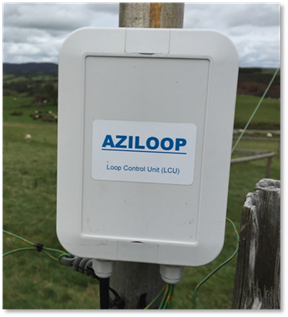
DF-72 Loop Control Unit (LCU)

DF-72 LCU

Loop Control Unit

No Control Cables

The antenna feeder also carries power and control signals to the LCU (Loop Control Unit). This makes antenna upgrades a snip if a coax feeder cable is already in place.

Designed for Outdoor Use

The LCU is housed in a high-quality purpose designed IP67 rated waterproof enclosure made from ASA (Acrylonitrile styrene acrylate) thermoplastic (as opposed to ABS) for excellent weather and UV resistance, zero corrosion, and minimal condensation. The lid of the enclosure is secured with six stainless steel screws which clamp it firmly in place via a waterproofing gasket.

Cables are fed into the box via compression glands and are clamped using superior quality rising-cage type terminal blocks.

The enclosure includes integrated pole mounts allowing installation to be completed quickly and easily with just a couple of cable ties or jubilee clips. When you’re out there fumbling about on a cold day, you’ll be glad of that.

Full Control

The LCU has a switchable balanced preamplifier with a gain of nominally 18 dB, optimally placed at the antenna to maximise signal to noise ratio and swamp any external noise pickup on the feeder. Ahead of the preamp are three selectable 7-pole filters, two low-pass and one high-pass, to give your receiver (and our preamp) an easier life if needed. The high-pass filter and one low-pass filter overlap to produce a band-pass response as a fourth filter option.

The terminating resistor in K9 mode is adjustable in 50 Ω increments from 250 Ω to 950 Ω.

The CIU (Common Interface Unit) has a 5-position attenuator: 0 dB, -6 dB, -12 dB, -18 dB and infinity (which isolates the receiver, terminating it in 50 Ω).

The combination of LCU preamp and CIU attenuator gives around 36 dB of level control allowing the user to achieve the best balance of signal to noise ratio versus dynamic range.

The CIU also has two auxiliary I/O lines that can be separately configured as inputs, or outputs. These can be operated remotely as well as locally. Uses include additional antenna switching, controlling other equipment, or in a remote scenario, mains-fail indication, intruder alarm, temperature alarm, remote fan control, equipment re-boot etc.

Mute Facility

An auxiliary I/O channel can be set up as a PTT sense line to quickly isolate a connected receiver and protect the LCU preamp from high RF levels. The second channel can be configured as another PTT input or a PTT-out line with a selectable delay. There is also a mute (talk) timer with visual display within the app.

Software

Intuitive UI (User Interface)

The antenna is controlled from a software app. Nowadays serious listeners usually employ some sort of computer based SDR receiver. Where better to control your antenna than on-screen next to your receiver display? Microsoft Windows 10 and 11 is officially supported, however Windows 7 has been tested and found to work.


K9AY mode icon

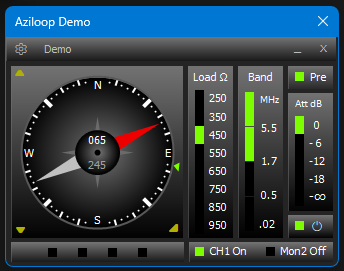
Unclutterd intuitive main UI
Side panels can be collapsed when not required.

Loop mode icon

Consistent settings style.
Everything accessed from the menu bar gearwheel icon.

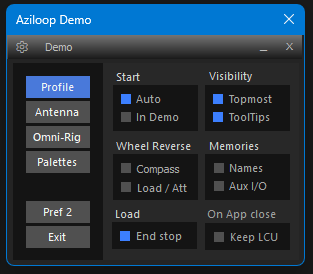
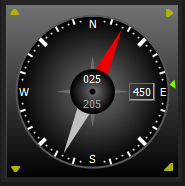
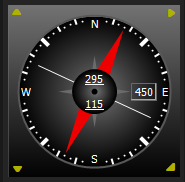
From the start, the aim has been to create an uncluttered UI, with all settings accessed via the cogwheel icon on the Menu bar. The compass panel is essential for controlling mode and direction, but all other panels can be selectively hidden when not required. Additionally, palette settings allow you to change colours to match your SDR display or whatever you prefer. You can create a drop-down list of different palettes and import or export custom designs. The Pref 2 Settings option exposes a number of add-ons (including OmniRig support - see below), all described in the User Guide.

Dual Mode – Loop and K9AY

Aziloop offers two antenna modes in one product giving you maximum flexibility by allowing you to choose between K9AY and Loop modes depending on your reception needs. There are no less than 108 mode/heading combinations available.

K9AY mode icon

K9AY mode, where Aziloop operates as a K9AY terminated loop giving a uni-directional cardioid pattern with 72 x 5 degree increments. The K9AY load resistor is adjustable in 50 Ohm steps for optimum performance.

Loop mode icon

Loop mode, producing the classic small loop figure-of-eight bi-directional pattern at low angles, and omni-directional pattern at higher angles. 72 headings gives 36 loop-axis options.

Instantly switch between modes or change heading using mouse wheel or buttons. Using a rotator is too slow, and often too late.

Remote Operation

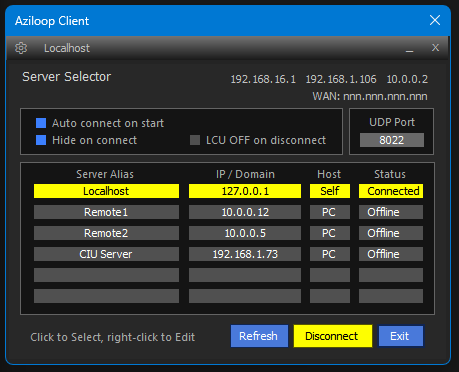
A remotely sited receive system is an increasingly popular pragmatic solution to local noise problems. You can control Aziloop from anywhere there’s an internet connection, as client / server mode is built into the app as well as local mode. At the antenna end use a PC via USB with the app in server mode, or directly connect to the CIU Ethernet port. At the client end set the app to client mode.

App in client mode operation
Server Selector panel
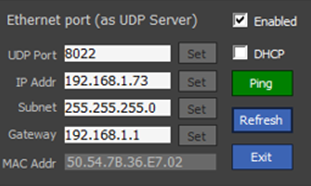
When using the built-in CIU server all settings are
configurable for your network needs.

CIU Ethernet setup screen
CIU Ethernet setup

Omni-Rig 1.2 Support - one of many extras included in the app

Aziloop now supports Omni-Rig, with extra functionality driven by your transceiver’s frequency, mode, and PTT state.

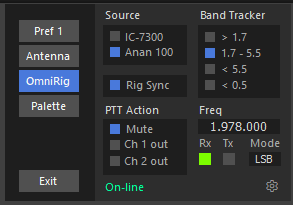
Omni-Rig support panel in the Aziloop app

This example shows Rig 2 selected, renamed here as Anan 100, and it’s in receive mode on 1.978 MHz LSB. Mute is selected so that Aziloop will go into Mute mode when the Anan 100 transmits.

Band Tracker is set to auto-insert the 1.7 to 5.5 MHz filter when in-band (multiple filters can be selected).

Rig Sync, as it implies, allows you to lock the frequency and mode of the two devices Omni-Rig can see. This also works if one is remote (as long as Omni-Rig is running at both ends).